
macOS App
Native desktop app — Apple Silicon & Intel
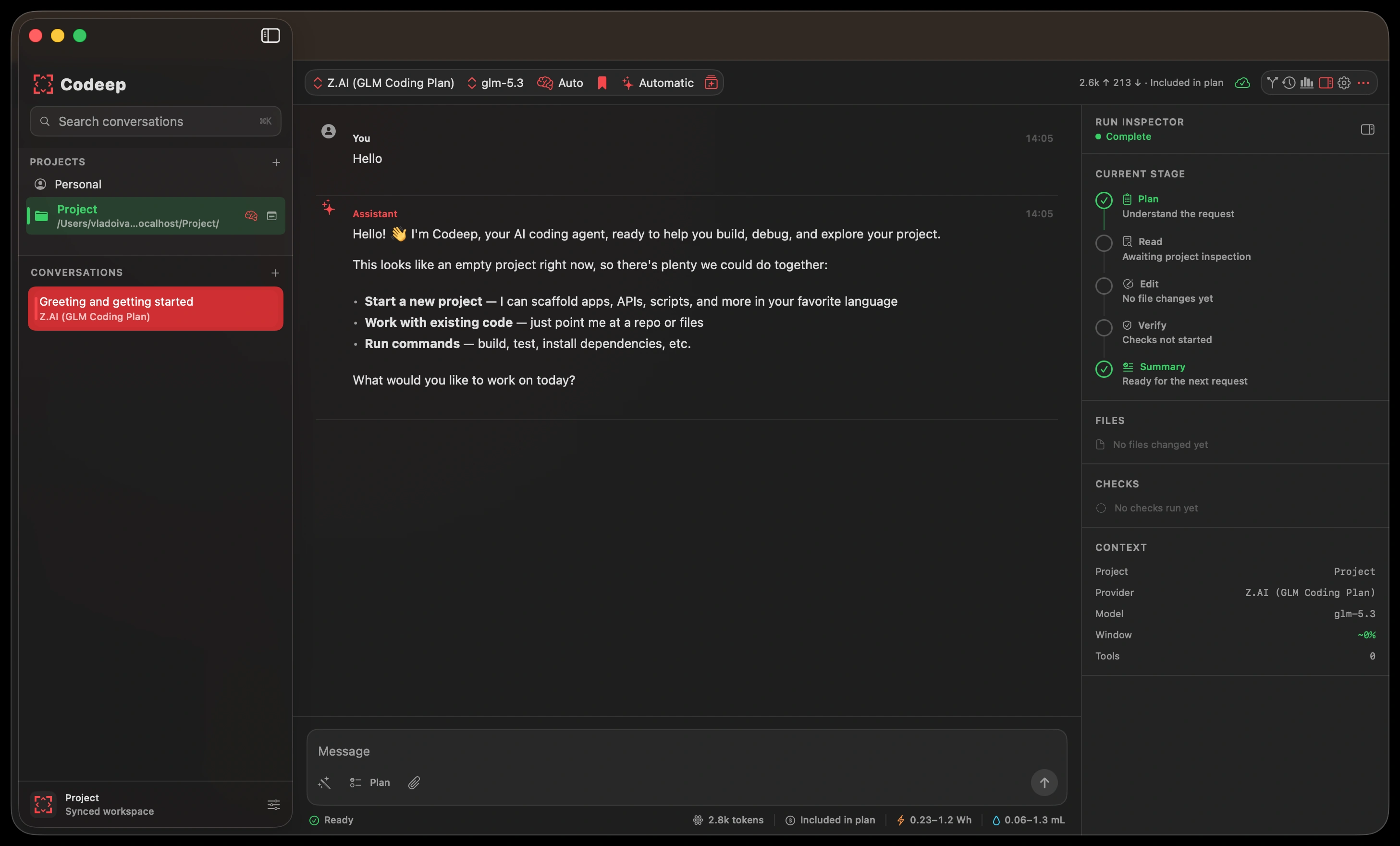
The Codeep Mac app is a first-class native client built in SwiftUI, not an Electron wrapper — the same agent as the CLI, with a desktop UX: a chat window, a project sidebar, inline diffs, tool confirmations, and a proper Settings pane. It runs the full agent locally (shell, git, file edits), so it ships outside the App Store as a notarized, Developer-ID-signed build. Spotlight and Shortcuts are built in.
Installation
Open the downloaded .dmg and drag Codeep into Applications. The build is notarized by Apple, so it opens normally — no right-click “Open anyway” dance.
First run
On first launch a welcome sheet asks for one API key — the only thing Codeep can't infer. Pick a provider, paste the key, and you're chatting. The provider you key becomes the active one for your first conversation.
Chat & the agent
Type a message and the agent streams back. When you open a project it can read files, run commands, edit code, and run git — each surfaced inline: tool calls are collapsible cards, edits render as diffs, and destructive actions pause for a one-click confirmation (tunable in Settings).
- Plan mode — draft a plan before the agent touches anything, then run it.
- Checkpoints & rewind — snapshot a conversation and roll back.
- Skills — one-tap workflows (commit, test, refactor, docs…) from the composer.
- Slash commands — same shortcuts as the CLI:
/scan,/recall,/plan,/export,/clear,/help. - Vision — paste or attach an image on providers that support it.
Slash commands
The composer accepts the same slash commands as the terminal CLI — so power users don't need to switch mental models. Anything starting with / that isn't recognized is forwarded to the agent verbatim, so future CLI commands keep working without an app update.
| Command | What it does |
|---|---|
/scan | Rebuild project intelligence (the CLI's /init) |
/recall <query> | Surface prior conversations matching the query |
/plan [task] | Arm plan mode; with a task, prefills the next draft |
/export | Open the export sheet (Markdown / JSON / plain text) |
/clear | Start a fresh conversation |
/help | List available commands in-chat |
Projects
Open a folder (File → Open Project, ⇧⌘O, or drag it in) to scope the agent to a codebase. Codeep scans the project for its stack and conventions, and a .codeep/directory in the project root keeps that history — the same convention as the CLI and VS Code extension, so a thread started in one shows up in the others.
Providers & models
Switch provider and model from the chat toolbar. Providers you've keyed show up top; the rest tuck under More providers…. The full set — Anthropic, OpenAI, Google, DeepSeek, OpenRouter, Z.AI, MiniMax, Kimi, Grok, Qwen Coding/Token Plans and the live ModelScope catalog (including pay-per-use and China endpoints), Ollama, and any custom OpenAI-compatible gateway — lives in Settings → API Keys.
Settings
⌘, opens Settings: API keys (per provider), local/custom endpoint URLs, appearance, response language, tool-confirmation and self-verify behaviour, MCP servers, the skills marketplace, a global system prompt, and an “About Me” profile that travels with every chat.
Sync with codeep.dev
Sign in under Settings → Account to sync conversations, keys, profile, custom commands and custom agents across the CLI, the Mac app, the VS Code extension, and the web dashboard. Hit Sync now any time to pull the latest.
Custom agents
Open Agent Studio from the ✨ button in the chat toolbar, with ⇧⌘A, or from the bottom of the persona menu. There you create or edit a specialist and choose its provider/model, tool boundary, project scope, and behavior. The compact persona control beside it selects which agent is active for the current chat; changes apply to the live conversation immediately.
custom-bot/v1 Markdown as the CLI and VS Code. Tool restrictions still sit underneath the app's normal approval and sandbox settings.Prefer the terminal?
The same agent runs in your shell:
See Installation and Quick Start for the CLI.