
Go Deep
into Code.
An autonomous AI agent that reads your whole project, runs commands, and writes & verifies code on its own — going deeper than autocomplete. Bring any model, hosted or local.
Works with any model
How it works
From prompt to verified code
Codeep handles the full development loop autonomously — no context switching, no copy-pasting.
You describe the task
Type your request in plain language. No special syntax required. Codeep reads your project structure and key files automatically to understand the context.
Agent plans and executes
Codeep breaks the task into steps, executes them one by one — editing files, running commands, fetching documentation. You watch it work in real-time.
Verified and ready
After making changes, Codeep runs your build, tests, or typecheck to verify everything works. If something breaks, it fixes it automatically.
Use cases
One command for every task
Codeep understands your codebase and executes real work — not just suggestions.
Capabilities
Everything you need to code with AI
From autonomous agent tasks to git workflows — Codeep handles the full development loop from your terminal. Green “New” tags mark what shipped in 2.0.
Autonomous Agent
Reads files, runs shell commands, edits code, and auto-verifies the result (build / typecheck / tests) — all in one loop. You describe the goal; Codeep handles the steps.
Sub-agents
Delegate a self-contained sub-task to a specialist that runs in its own fresh context and reports back — researcher, reviewer, tester, or your own. Keeps the main thread focused; optional auto-review after every change.
Plan Mode
Preview the agent's full plan — files it'll touch, commands it'll run, risk it self-assesses — before any code changes. `/plan <task>` → review → `/go` to execute.
Full Project Context
Auto-scans your project structure, detects language and framework, reads key files. No manual context setup. Project memory + lifecycle hooks persist across sessions.
Personalities
Switch agent tone mid-conversation: concise, verbose, security-paranoid, senior-reviewer, junior-mentor, ship-it. Or drop your own Markdown file in `.codeep/personalities/`.
User Profile
Tell Codeep how you like to work — reply language, response style, default stack, hard rules — and it adapts on every project and surface. Opt-in auto-learn picks up your preferences from sessions; sync across machines and the dashboard.
Git Workflows
AI review of your diff — bugs, security, performance, edge cases. Semantic commit messages. Works with any git repository. Hooks let you gate commits on custom checks.
OpenRouter
100+ models from Anthropic, OpenAI, Google, Meta, DeepSeek, Mistral via one key. Authoritative cost from `usage.cost` — your dashboard sees the same numbers as your invoice.
Prompt Caching
Automatic on Anthropic (and OpenRouter → Anthropic routes). Cache hits bill at 0.1× input rate; typical agent session is 60-90% cheaper. No config, just upgrade.
MCP Marketplace
Curated catalog of 12 Model Context Protocol servers — filesystem, GitHub, Postgres, browser, Slack, more. One command install. Sampling guards keep credits safe.
Skill Marketplace
Write a SKILL.md (Markdown + YAML frontmatter), agent auto-invokes when triggers match. Publish to share — `/skills install <owner>/<slug>` from any machine. Claude Code-compatible.
VS Code & Zed (ACP)
Native agent inside VS Code and Zed via Agent Client Protocol. Same CLI binary, same commands, native diff viewer, image paste, manual confirmation mode.
Personal Dashboard
Link with `codeep account` to sync sessions, profiles, skills, and API keys across machines. Track cost-per-model, file bug reports, manage devices — all at codeep.dev.
Secure & Local
API keys stored locally (encrypted at rest, synced encrypted if you opt in). Dangerous commands require confirmation. Full undo history. `/checkpoint` snapshots for safety.
MCP marketplace
One command, real integrations
Codeep speaks the Model Context Protocol — connect to your filesystem, GitHub, databases, browsers, Slack, anything that exposes an MCP server. Curated catalog, install with /mcp install <id>.
Filesystem
Files & CodeRead, list, and (optionally) write files in a sandbox directory.
/mcp install filesystemGitHub
Files & CodeBrowse repositories, issues, PRs, and commits via the GitHub API.
/mcp install githubPostgreSQL
DatabaseRead-only SQL access to a Postgres database — schema introspection + query.
/mcp install postgresSlack
CommunicationRead channels, post messages, look up users and threads.
/mcp install slackFetch (web)
WebFetch arbitrary URLs and return the markdown-converted contents.
/mcp install fetchPuppeteer (browser)
WebHeadless Chromium for navigating, screenshotting, and scraping pages.
/mcp install puppeteer
Plus /mcp add for any custom server (npx, binary, or HTTP endpoint)
Skill marketplace
Skills that travel with you
Drop a SKILL.md in .codeep/skills/ and the agent auto-invokes it when triggers match. Publish to share — install on any machine with one command. Claude Code-compatible format.
- sharepoint-spfxv1.0.00
Build, debug, package and deploy SharePoint Framework (SPFx) web parts, extensions and apps for SharePoint Online and Microsoft Teams.
/skills install VladoIvankovic/sharepoint-spfx

Or write your first skill — Markdown + YAML frontmatter, ~5 minutes
Installation
Up and running
in 30 seconds
Choose your preferred install method. Codeep runs on macOS, Linux, and Windows (WSL). No configuration required — just run codeep to start.
AI Providers
Use any LLM you want
Codeep works with all major AI providers. Switch between them at any time from the settings menu. Your keys are stored securely on your machine.
Anthropic
Claude models — Opus, Sonnet, Haiku
DeepSeek
Pro and Flash models
Google AI
Gemini Pro and Flash models
MiniMax
Coding plan and pay-per-use
Ollama (Local AI)
Run models locally or on a remote server — no API key required
OpenAI
GPT models — flagship, Mini, Nano
OpenRouter
One key, 100+ models from every major provider
Z.AI
Coding plan and pay-per-use
All providers use the OpenAI-compatible API format or Anthropic protocol. Switch anytime with /settings
Codeep for Mac
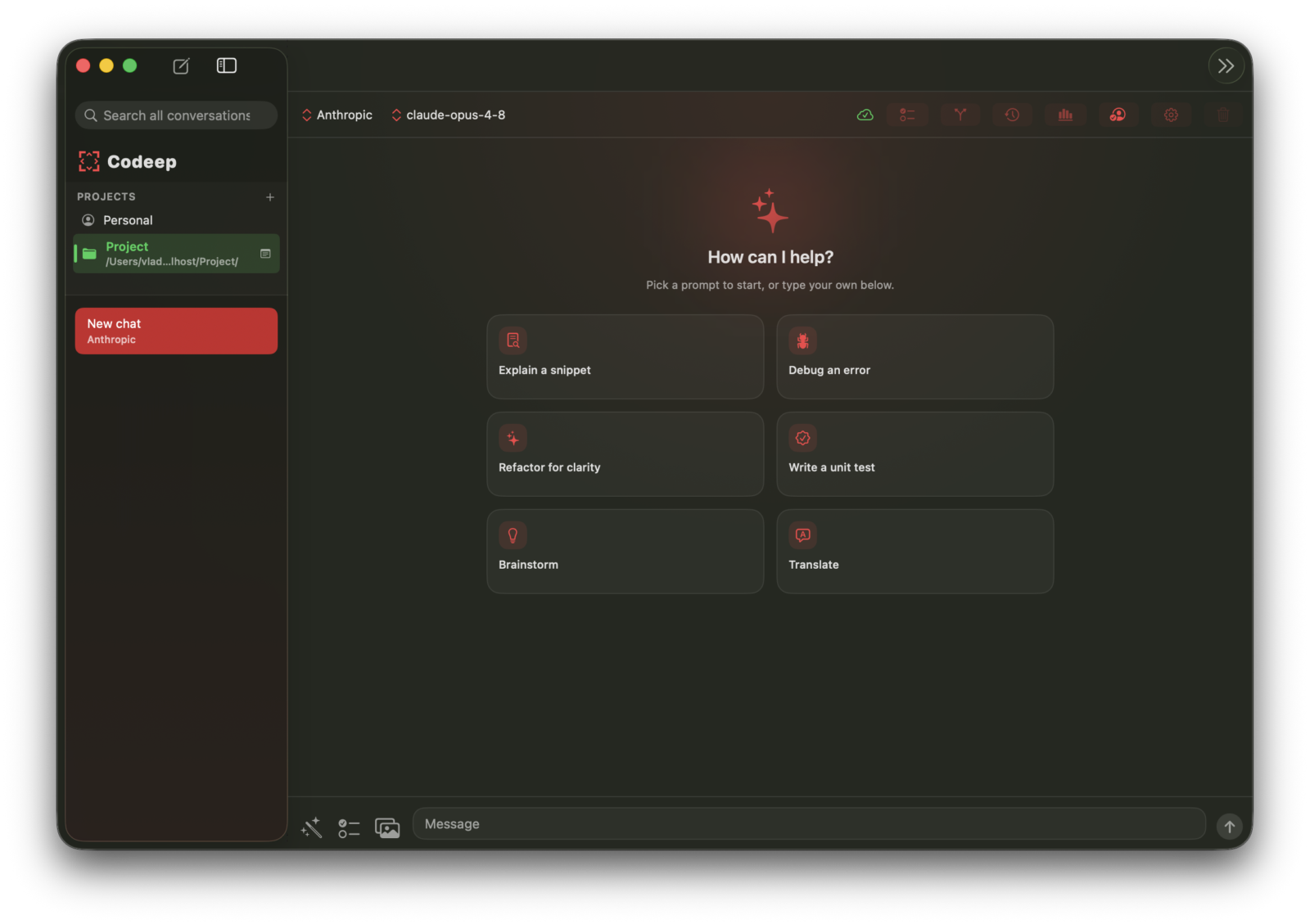
A first-class native desktop app — the same agent as the CLI, with a chat window, a project sidebar, inline diffs, and a real Settings pane. Built in SwiftUI, not an Electron wrapper.
- Runs the full agent locally — shell, git, file edits
- Project sidebar with inline diffs and tool confirmations
- Every provider — Anthropic, OpenAI, Z.AI, MiniMax, Gemini, Ollama…
- Keys in the iCloud Keychain; syncs with the CLI & dashboard
- Auto-updates via Sparkle; Spotlight & Shortcuts built in
Native Zed Editor integration
Codeep runs as a native AI agent inside Zed via the Agent Client Protocol (ACP). Use all 30+ Codeep commands directly from the Zed chat panel.
- Full slash command support in Zed chat
- Live tool call display as agent works
- Thinking indicators during reasoning
- File edit notifications in real-time
VS Code extension
Codeep is now available as a VS Code extension. Get the full AI coding agent experience directly in your editor — no terminal required.
- Chat sidebar with streaming responses
- Live agent plan — watch multi-step tasks update in real time
- Session browser — load and resume past conversations
- Inline permission prompts with diff preview before Allow
- Settings panel — switch model, provider, and mode
- @file mentions — type @ to attach any workspace file
- Send selected code or review any file from the editor
Releases
Shipping fast
v2.5.0
New: codeep review (offline, CI-friendly code review) and Continue (a paused-at-the-limit run resumes when you say "continue" instead of dead-ending). Plus a fix where file edits or skill params containing a $ could be…
v2.4.2
Stability: an unexpected error no longer crashes Codeep to a garbled terminal — it's logged, your conversation is saved, and recoverable background errors keep the session alive. Also fixes codeep account occasionally…
v2.4.1
MiniMax M3: the new MiniMax flagship replaces M2.7 across all three MiniMax providers (subscription, pay-per-use, China), with updated pricing and context window so cost tracking stays accurate.
Is my code sent to a third party?
Only to the LLM provider you choose, only when you invoke the agent. Codeep is a thin client over your API key — file contents, prompts, and tool calls go straight to Anthropic / OpenAI / Z.AI / OpenRouter / etc. We don't proxy anything through codeep.dev. The optional dashboard sync (opt-in viacodeep account) uploads session metadata and learning preferences only — never raw code. Privacy details.Does it work offline?
Yes — pickollamaas your provider. Codeep talks to a local Ollama daemon, so no network call leaves your machine. Tool calls (read/write files, run commands) are unchanged. Smaller local models are slower at multi-step reasoning, so set/settings → Max Iterationshigher and expect more back-and-forth. Provider docs.What does it cost?
Codeep itself is free + open source (Apache 2.0). You pay your LLM provider directly. For OpenRouter, Codeep shows the exactusage.costfrom each response on your dashboard. Prompt caching (default on Anthropic)typically reduces a session bill by 60-90%. For Z.AI on the GLM Coding Plan, it's flat-rate. How caching works.Which model should I use?
For coding: Claude Opus 4.8 (Anthropic) or GPT-5.5 are the strongest. For cost-per-token: DeepSeek V4 Pro or GLM-5.1 are 5-10× cheaper with little quality drop on typical tasks. For local: Llama 3.1 70B via Ollama (needs 24GB+ VRAM). Or set provider toopenrouterand modelopenrouter/auto— the router picks for you per request. Provider matrix.How does it compare to Cursor / Claude Code / Aider?
Codeep is terminal-native (TUI + ACP for Zed / VS Code), multi-provider by design, and open-source. Cursor is a fork of VS Code locked to its own backend. Claude Code is Anthropic-only and closed-source. Aider is terminal-native too but doesn't do ACP or skill bundles. If you want one tool that works the same across CLI, Zed, and VS Code with any provider — Codeep's the bet.Can I use my own LLM endpoint?
Yes — for any OpenAI-compatible endpoint, pickollamaprovider and set/settings → Ollama URLto your endpoint. Authentication header is configurable. Self-hosted vLLM, LM Studio, or any inference server that speaks OpenAI's/v1/chat/completionsworks.What's MCP and why should I care?
Model Context Protocol — the emerging standard for letting LLMs talk to external systems. Codeep supports it end-to-end: connect a Postgres server, GitHub, browser automation, Slack, anything that speaks MCP. Browse 12 curated servers on the marketplace or add custom ones with/mcp add.Do I need to log in to codeep.dev?
No — Codeep works fully offline with just an LLM key. The optional account (free, GitHub OAuth) syncs session history, profiles, and learning preferences across machines, and unlocks the skill marketplace publish flow. Everything is opt-in. Account docs.
Open Source
Start coding with AI today
Free and open source. Works with your existing AI provider subscriptions. No account required to get started.